
After three articles, where am I with my venture in to IPv6? What have we really achieved so far? Well, in functional terms, not so very much yet!!
To recap:
- Here I covered a lot of ground, getting basic IPv6 running on a Linux gateway box connected to an ISP providing native IPv6, while remembering stuff like the need to set up a firewall.
- Here I looked at the issue of IPv6 firewall logging
- And here I looked at the need to set up a default route out of the gateway device pointing back towards the internet.
And what can I now actually do? Well……. from the gateway box I can ping out successfully to any IPv6 device on the Internet. In other words, logged in to the device in green on this diagram, I can ping out of eth0 over the Internet. And from an IPv6 device on the Internet I can successfully ping towards my green box, using the address of eth0. So I can ping from the Internet to (these are of course made-up addresses!) 123::456.
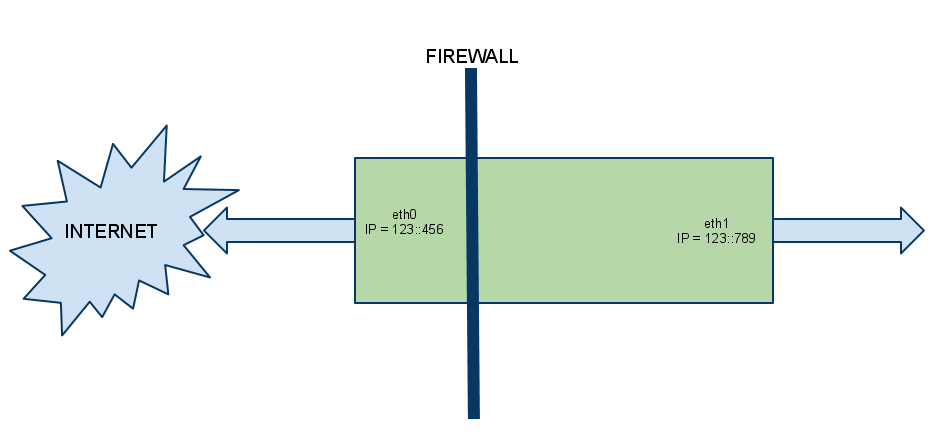
However if from my remote Internet location I ping instead the IPv6 address of eth1 (here 123::789) does it work? I might expect it to: after all, eth1 has a global IPv6 address on it, not a private address. So surely I can ping it?
Needless to say, as it stands I cannot. Here we look at why not – in the process covering an important element of turning our gateway device in to an IPv6 router (which, grand though it sounds, is exactly what we are doing here!) which receives very little coverage elsewhere on the Internet. In fact when researching this I came to a conclusion that the vast majority of folks who have dabbled with IPv6 in the domestic environment have terminated their ISP IPv6 connection on their workstation, and very few have gone the step further and used a device as a gateway to a home network!!
How to get through the gateway – Â or Come back ARP, all is forgiven
So when I ping 123::789 what stops it working? The first thought is: firewall. We’re blocking it, right? A quick trip to the shorewall6 log (glad we set that up, eh?) shows us: nothing. Nowt. Zilch. Nada. Surprisingly, we’re not dropping the ping. (In fact the firewall config we set up in the first of these articles contains enough already to allow, from a firewall perspective, for this ping to succeed.)
So we now run tcpdump on eth0 to see just what is going on. Here’s an example:
From the remote host
From my remote IPv6 host I do and see:
ping6 2a01:XXX:8b25:7ea0::22PING 2a01:XXX:8b25:7ea0::22(2a01:XXX:8b25:7ea0::22) 56 data bytesFrom 2a01:XXX:8b25:7ea0::1 icmp_seq=1 Destination unreachable: Address unreachableFrom 2a01:XXX:8b25:7ea0::1 icmp_seq=2 Destination unreachable: Address unreachableFrom 2a01:XXX:8b25:7ea0::1 icmp_seq=3 Destination unreachable: Address unreachable...
Which doesn’t tell me a lot.
On the gateway
On my gateway, from tcpdump, I see:
tcpdump -i eth0 -v ip6tcpdump: listening on eth0, link-type EN10MB (Ethernet), capture size 96 bytes08:51:35.315038 IP6 (hlim 255, next-header ICMPv6 (58) payload length: 32) fe80::207:cbff:fea5:XXX > ff02::1:ff00:22: [icmp6 sum ok] ICMP6, neighbor solicitation, length 32, who has 2a01:XXX:8b25:7ea0::22source link-address option (1), length 8 (1): 00:07:cb:a5:1a:6808:51:36.315002 IP6 (hlim 255, next-header ICMPv6 (58) payload length: 32) fe80::207:cbff:fea5:XXX > ff02::1:ff00:22: [icmp6 sum ok] ICMP6, neighbor solicitation, length 32, who has 2a01:XXX:8b25:7ea0::22source link-address option (1), length 8 (1): 00:07:cb:a5:1a:6808:51:37.315001 IP6 (hlim 255, next-header ICMPv6 (58) payload length: 32) fe80::207:cbff:fea5:XXX > ff02::1:ff00:22: [icmp6 sum ok] ICMP6, neighbor solicitation, length 32, who has 2a01:XXX:8b25:7ea0::22source link-address option (1), length 8 (1): 00:07:cb:a5:1a:68
What does this tell me?
So the ping is reaching the gateway device alright. Sort of. Well, not really. But there’s something going on there! What we see in that tcpdump trace is the ISP’s router to which I’m connected is sending me a Neighbor Solicitation for the ::22 address (i.e. the global IPv6 address of my eth1 interface on the “far side” of my gateway which I’m trying to ping) While I’m not keen to draw too many parallels and comparisons with IPv4, it is useful to do so here: A Neighbor Solicitation is, at least as we see it here, pretty much analogous to a good ol’ ARP Request. The ISP is saying to us “I think this address is somewhere over with you – Please confirm and let me know how to reach it”. Which is great, except for the glaring fact that we appear to ignore this NS (Neighbor Solicitation) and hence the ping fails.
So you can guess we need to set something up on the gateway that tells it to reply to such a NS. (Kinda vaguely analogous to a Proxy ARP, if you’re familiar with that)
IPv6 Proxy
A couple of steps here. Firstly the system needs to be told globally to perform the required IPv6 proxying, and we then need to enable it for specific addresses.
proxy_ndp
In the /etc/sysctl.conf file add a line:
net.ipv6.conf.all.proxy_ndp = 1
To set this dynamically (without a reboot) you can also do:
sysctl -w net.ipv6.conf.all.proxy_ndp=1
Neighbor proxy
Then perform:
ip -6 neigh add proxy 2a01:XXX:8b25:7ea0::22 dev eth0
Note that here the IPv6 address is the address of the interface on the private side of the gateway (eth1 for me). The end part “…dev eth0” is to say “Proxy that address from this interface”.
You also, of course, will need to make such configuration permanent. Numerous approaches to that: I settled upon adding this from the interface-up scripts in /etc/network/if-up.d/ but there are so many other methods too. Pick yours.
(Interestingly, I have yet to discover any way at all to display the list of proxied neighbors added in this manner! I’ve looked pretty hard, but there appears to be no way I can find to have them listed. There must be a way, but I can’t find it.)
Success!
And the ping now works, with a tcpdump like this now showing to us:
09:18:18.644817 IP6 (hlim 255, next-header ICMPv6 (58) payload length: 32) fe80::207:cbff:fea5:XXX > ff02::1:ff00:22: [icmp6 sum ok] ICMP6, neighbor solicitation, length 32, who has 2a01:XXX:8b25:7ea0::22source link-address option (1), length 8 (1): 00:07:cb:a5:1a:6809:18:18.868550 IP6 (hlim 255, next-header ICMPv6 (58) payload length: 32) fe80::240:63ff:fef5:XXX > fe80::207:cbff:fea5:XXX: [icmp6 sum ok] ICMP6, neighbor advertisement, length 32, tgt is 2a01:XXX:8b25:7ea0::22, Flags [solicited]destination link-address option (2), length 8 (1): 00:40:63:f5:f9:3c09:18:18.868958 IP6 (hlim 56, next-header ICMPv6 (58) payload length: 64) ipsi6 > 2a01:XXX:8b25:7ea0::22: ICMP6, echo request, length 64, seq 509:18:18.869107 IP6 (hlim 64, next-header ICMPv6 (58) payload length: 64) 2a01:XXX:8b25:7ea0::22 > ipsi6: ICMP6, echo reply, length 64, seq 5
Which has 4 elements:
- The same sort of Neighbor Solicitation we had previously.
- This time we send back a Neighbor Advertisement for the ::22 address
- With that done, the ping itself can come to us (the ICMP6 echo request)
- And we of course respond to the ping with ICMP6 echo reply.
Conclusions and summary
In the world of IPv6, with no ARP or NAT, life is different. Devices which in IPv4 are thought of as private (both in terms of addressing and functionality) are now, at least from the perspective of addressing, public. We need to make sure that if we want “The World” to be able to reach them, we must in turn tell the world about them. Hence the need for IPv6 neighbor proxying. And, thinking ahead a little, the need to take our firewalling ever more seriously. If I make the addresses of a “private” workstation globally reachable I’d better make sure that it’s protected…
The last point to make is about scalability: do we really need to add an “ip -6 neigh add proxy” for each private device we wish to be able to reach from the Internet? If there are only a few devices (as in the typical home network) then it may well be easiest to do this. However in situations where the private side of the network has many IPv6 addresses which need to be globally reachable, other solutions may be more appropriate and manageable, but will not be covered here. Here we’re trying to get a small home network IPv6 enabled, not migrate a corporation to IPv6. If you really want to get in to the area of automating these functions you need to read up on implementations of Neighbor Discovery Protocol, Â look at “zeroconfig” networking, Apple’s Bonjour service, and so on..
There will come a time when such automation will be required at the domestic level, with the eventual proliferation of networked devices. But for now we keep it simple and statically configure the required addresses.
EDIT 5 Aug 2011: npd6 – See project here http://www.ipsidixit.net/2011/08/04/npd6/
Hello,
Good post, very userful. I’ve been struggling with ipv6 routing for some time, and the problem was that my router wasn’t answering the ICMPv6 Neighbour Solicitation messages.
I made it work on a per host basis, with “ip -t neigh add …”, e.g.:
ip -6 neigh add proxy 2001:xxxx:2:yyyy:a000::2 dev eth0
But how can it be done to proxy for a subnet?
Scenario:
Router with a /64 native ipv6 network assigned.
Behind the router, 2 different networks, each a /68
How could I make the router answer neighbor solicitations for each /68 subnet, so that the packets can reach the router and can be forwarded to the specific subnet?
Thanks!
Good question! In a couple of words: “I don’t know. Yet” 🙂
When writing up my mini IPv6 howtos one of the things that has genuinely surprised me is the relative immaturity of IPv6 implementation for a small home device, when taken a a whole. Most of the elements themselves are robust and have actually been around for years now. But hanging them all together is clearly something that not too many people have yet done!
I do not yet know of a Linux service which will allow me to respond to Neighbor Solicitations for a range of addresses. Sure, with RAD I can myself act as a router and advertise networks, as I do to my internal network. But the specific function of sending a neighbor advertisement based upon a range of addresses? I currently simply do not know. I guess what you (and I) are really looking for is a command along the lines of:
ip -6 neigh add proxy 1111:2222:3333:4444/64
so that any neighbor solicitation received for an address within the subnet gets responded to?
I’ll keep looking – I find it hard to believe it’s not possible. But I do not know how today.
Adding a bit to my comment above about Neighbor Discovery: maybe a quick ‘n dirty NAD (Neighbor Advertisement Daemon) needs writing!
RFC 3756 details the security considerations of an implementation of NDP. Of the three models described therein, we would want to consider ourselves as a “Corporate Internet”, as we trust ourself and the private-side devices attached to us. And, anyway, in the home environment we will only typically have a single router: our gateway device itself. So I think that this model is correct.
The IETF’s Secure Neighbor Discovery will likely form the basis of NDP in the longer term. But in the shorter term it would seem that we could perform NDP as per RFC 4861 and fill a bit of a hole that exists today.
The hole is that IPv6 implementations to date seems to assume that a device is either a full-fledged router or it is an end-point. While “our” gateway device can and does act as a full-fledged router (I can kick out via RADVD router advertisements to my heart’s content) my ISP sees me as an end-point. It sends me router advertisements, but isn’t interested in seeing any back (which, from a security model point of view, is not wholly unreasonable!) When it wants to “route” anything within the /64 range to me it first requires a satisfactory neighbor solicitation/advertisement exchange to take place.
Hence the need to proxy the IPv6 neighbour discovery.
Watch this space. I might just rustle something up…! In the near future I might be after a beta tester or two. 🙂
Have you found anything yet? I’m still struggling with Xen+IPv6+vif-route and a /64 subnet from Hetzner (they don’t give out /48, bummer). The VMs get assigned a /80 subnet, although only 1 address is reachable: the one set with ip n a proxy $addr eth0.
I have tried radvd announcing the /80 on the host’s eth0, but to no success.
A solution could be to add all addresses in the /80 to the neighbor proxy list, but that need not be necessary, methinks.
Any thoughts?
I discovered the hard way that radvd doesn’t work unless you have a /64.
You need a block that size so that autoconfiguration of ipv6 address which uses the ether mac will work.
HTH
Paul
Right – well I guess the issues is less radvd, but the who auto-config mechanism itself which gets used by the clients. While I use radvd, I’ve pondered playing with DHCP6 but not been silly enough yet. Maybe. 🙂
[…] if you have input and/or improvements i would be glad to hear them. This approach is based on using proxy_ndp and can only route specific IPv6 addresses to a domU. We currently have no need for subnet routing […]
I’m also looking at this topic and this particular problem of proxying a subnet (or actually the whole /64 obtained from the WAN minus the address of the proxy machine itself). Have you learned new things since April?-)
Thanks.
This tuto is a lie, we need a per ip proxy commande with ip neigh.
Thanks for your insightful input there. Leaving aside your rather rude preface, you might just re-read it and see that, to use your wording, you have “a per ip proxy command with ip neigh.” Indeed if you read carefully, you will see that “this tuto” goes to some lengths to point out that this is not only required but a substantial limitation…
Hi sgroarke,
thanks for that extensive blog entry. I had exactly the same situation and came up to the tcpdump part on my own. Then I got stuck until I found this gem here.
I hope soon somebody finds a nice solution for the “ipv6 complete subnet neigh proxy” situation.
Regards,
Voo
Hi sgroarke,
I think the command you are looking for is the following:
ip -6 neigh show nud noarp
hth,
Michele
Blah, nevermind. There really seems no way to list the manually set proxies. Time to look at the code I guess
Shame! I was all excited about that – was about to try it. 🙁 Still, if you find it, do let me know – it’s mad that it’s so difficult/impossible to do.
It’s a limit in the kernel ATM. It won’t export the proxies. It’s not even the userspace tools. (http://canuck.infradead.org/pipermail/libnl/2010-December/000177.html)
Oh dear. I had poked around the user tools and drawn a blank – your info seems to confirm why. Pretty odd, but confirms a recurring feeling I’ve had when playing around with IPv6 on Linux: the basic elements are in place, solid and robust, and have been there for some years. Yet, presumably because until recent times no one has really exercised IPv6 much, the actual level of integration and usability of IPv6 on Linux is fairly primitive. Indeed the reason for writing these articles on it was motivated by the startling lack of information – when I started out doing some of this really very basic configuration, where the usual Google search returns so much information it’s hard to know which to look at, time and again I found that the answer I was searching for was either inadequate or absent (or I couldn’t find it…!) Still, I guess that’s how things get done: folks like us fill in the gaps!
FYI:
Works now with the following two commits
commit 84920c1420e2b4a4150e5bb45ee5a23ea4641523 (for the kernel sill in net-next)
commit 1dac7817b44f0dea2828c2b897c7b3c81550e057 (for iproute2)
[…] IPv6 – Proxy the neighbors (or come back ARP – we loved you really) […]
I was searching docs on the Net,concerning the use of ProxyNDP and/or the need for manual neighbor entries.
I personally have yet to run across a need to add ProxyNDP or add manual neighbor entries.
I run four IPv6 OVZ nodes,each routed on a /84,cut from a /64.
The edge router is the specific /64.
From the outside,all containers are reachable.
From the inside,some are only reachable,if the firewall allows it.
On any Node,the edge router is listed as a neighbor,along with the given link-local address of the Ethernet bridges on the specific Node.(Each Node runs three bridge groups,one being for VM’s.)
As long as there is traffic flow on the Node’s,I never seem to lose neighbor entries.
Once flow stops,then the neighbor entry becomes stale.
If have no problems in reaching other containers,from a Node,on any given subnet.
What am I doing right/wrong?
Is there any advantage to adding manual neighbor entries,if the cache goes “stale” for a specific entry?
I’m actually wanting to know,as this seems puzzling to me.
Great to hear when things work!! I think the issues I ran in to (and many other folks) is that my ISP treats me as a simple end-point, and ignores any router advertisements from me about “what’s behind that point”. Despite having a bazillion IPv6 addresses potentially hiding there in the /64 subnet, no allowance is made for me having any other mechanism in place other than “Neighbor?” from ISP, and I go “Yup, over here” back. If I send a router advertisement to my ISP they simply ignore it. Of course I can understand why… If they are to accept router advertisements, they have to have some level of policy enforcement on their side to make sure I don’t feed them dangerously wrong information. Unfettered router ads are like bad BGP feeds – way too easy to trust, and bad news if you do!
I guess in your case you are treated by your provider as a network, rather than a simple end point. I am guessing (well, wildly speculating actually!) that you put out router advertisements to your ISP, and they accept them? Do you think it’s that? Hence your ISP doesn’t need to do the neighbor solicitation/response two-step every time you come from the Internet side? Have you sniffed (tcpdump’ed) your connection to the ISP to see how it all hangs together?
I must have played around for IPV6 for 2 weeks before I could even get it to work properly. Now I’m at the same roadblock that you’re experiencing. Why is it not just as simple as telling the router that xxx subnet is on this interface. I want to be able to assign subnets to my clients and from the looks of it I’m not going to be able to. This problem is pretty much hindering my IPV6 adoption.
Any ideas? Why does it not just proxy any ip by default? Is it possible to set a default proxy interface?
If they want everyone to use IPV6 these tools for service providers need to be in place.
Hey,
Have you tried ip -6 neigh add proxy XXXX:XXXX:XXXX:XXXX:: dev eth1 ?
I’m trying to assign an /80 to clients. I assign over PPP interfaces.
ifconfig ppp0 inet6 add XXXX:XXXX:XXXX:XX:0001::1/80
ip -6 neigh add proxy XXXX:XXXX:XXXX:XX:0001:: dev eth1
Seems to work for me. Still having issues with the client assigning a default route and trying to get the client to automatically assign itself an ip. But one problem at a time.
I would say your ISP has got it wrong. IMO they are still thinking in the resource constrained IPv4 mindset. They should be routing two /64’s down your wire. One for the network between your router and them and one for your internal network.
Also if the link between you and them is actually a pointopoint just a /128 for your router’s outside port would be correct.
Fantastic Article.. 🙂
Its people like us that are helping drive ipv6 forward, by providing information and know-how..
The limited information is part of the reason of a slow migration..
Cheers
Good article. I am having similar but not the same problem. I have a sixxs tunnel with a routed /48 from them coming over a 6to4 tunnel. On the my internal interface I have a linux box that I am trying to use as a router.
EG:
sixxs tunnel box internal if – eth0 2001:4830:xxxx:1000::1/56
linux router box external if – eth1 2001:4830:xxxx:1000::254/56
all this is good I can reach 2001:4830:xxxx:1000::254 from my home box over a ipv6 tunnel.
linux router box internal if – eth0 2001:4830:xxxx:1001::253/64
from the sixxs tunnel box I can’t ping6 2001:4830:xxxx:1001::253. I see the same problem you described
neighbor solicitation, who has 2001:4830:xxxx:1001::253 on the linux router box and I would
expect the linux router box to answer but it doesn’t.
Hello, I solved my problem I needed a specific route from my sixxs gw to the external address of my linux router box. Then everything started working. I had a route like:
2001:4830:xxxx:1001::/64 dev eth0 metric 1024 mtu 1500 advmss 1440 hoplimit 4294967295
but i needed:
2001:4830:xxxx:1001::/64 via 2001:4830:xxxx:1000::254 dev eth0 metric 1024 mtu 1500 advmss 1440 hoplimit 4294967295
For those coming here after me: Indeed, the Linux IPv6 implementation is perfectly fine. What’s fucked up is the providers’ handling of IPv6 and if your provider fucks it up, you should start demanding proper IPv6 from them.
1. Proxy NDP is a horrible hack that should actually not be necessary. Among other issues, as neighbour discovery works via multicast (as opposed to broadcast for ARP), Proxy NDP for whole subnets would require switching the ethernet interface into promiscuous mode so as to receive all discovery messages. Also, Proxy NDP requires the upstream gateway to do neighbour discovery for each address separately, which (a) takes time and (b) consumes memory for storing the neighbour cache entries.
2. it’s completely braindead that providers are giving out single /64s. There is no shortage of IPv6 addresses, and that’s intentional. The idea is that you can always assign sufficient address space to make things work easily without such hacks as proxy NDP or splitting /64s or NAT or who knows what.
As for europe, for example, you should know that any RIPE member gets one /32 for free (the membership isn’t free, of course, but if you are a member in order to get IPv4 addresses anyhow, you get the IPv6 /32 without any additional charge). That would be ~ 4 billion /64s. Also, the RIPE’s policy is that you can assign a /48 to end users without any justification whatsoever – and of those, after all, every RIPE member has 65535 for free. There is even an RFC detailing why giving out single /64s is a bad idea and what to do instead (RFC 6177, just read it, it’s an easy read). Heck, even the Deutsche Telekom has understood this and has announced that they plan on routing a /56 to the DSLs of end customers(!) by default.
So, the intended way to handle this is to use explicit routing with appropriately sized nets: just configure the upstream gateway with one route for your machine on the common network segment plus one route for the remainder of your (/56 or larger) subnet pointing to an address of your machine on that network. That way you can do proper subnetting without losing autoconfiguration or otherwise fucking up your network and the upstream gateway has to do neighbour discovery for a single address only.
My ISP allocates a /64 to me, I set up radvd on the internal LAN and that’s all I had to do, none of the above was needed; oh, I did have to manually set a default route on my WAN interface (which only has a link local IP).
http://www.litech.org/radvd/
I have an odd problem. ipv6 works perfectly, I can “ping6 ipv6.google.com” from within my network, but ONLY after I have done a ping6 to the ISPs router first.
Looking at this + your earlier comment that you didn’t have the proxy issue described here suggests your ISP is doing things differently – which is hugely possible!! What would be interesting is to tcpdump the WAN interface during your scenarios and understand what it’s up to. Plus also check the ipv6 neighbor associations which come and go dynamically during this.
Interesting article. I’m having a very frustrating time getting an IPv6 bridge set up on Ubuntu (via bridge-utils), and am basically running into similar problems with NDP. I’m sure my issues are beyond the scope of what can be dealt with this way, but the general issues are:
1. Lack of knowledge on the part of ISP’s. My /64 is the first one our (hosting) ISP has doled-out.
2. Lack of thought as to how customers would use their /64’s by the ISP. From their standpoint, they give me my /64, and their job is done. For instance, what makes the most sense, a router or a bridge?
3. Equipment issues. Not everyone can afford to go out and buy new, IPv6-capable (Cisco) hardware. Hence why I’m trying to get an Ubuntu VM up to do bridging (via VLANs).
4. Most useful examples are either for tunneling setups (which are easy to get working – I’ve done it), or for single-host native setups. How about just one, useful example of getting a fully-functional, native IPv6 bridge working?
FWIW, I can ping from my bridge both outside (e.g. to ipv6.google.com) and to inside machines, but inside machines don’t see NDP queries, and the bridge can’t see NDP queries from the inside interface, so the outside world can be reached from inside. All ebtables/ip6tables rules are default, so all traffic should be accepted. tcpdump reports nothing working from the inside.
I may try to set up an IPv4 bridge first, make sure I have all of the VLAN/VM nonsense out of the way, and then try again with IPv6. (I’m pretty sure the VLANs are OK, and I can ping6 OK between VM’s OK on the inside segment).
IPv6 bridging…. gadzooks. I’m still up to my neck with the routing side. Of course, bridging should, conceptually, be simple! But just as with IPv4, there’s a whole host of gotchas, I guess. I have to say that I’m keeping away from bridging in IPv6 for now – so can’t report any suggestions.
One question from my side that occurs is about security: if you bridge the ISP’s IPv6 into your private network(s) (you mentioned VLANs…) will you firewall each inside machine? Or do some sort of L2 firewall on the bridge (I guess raw ip6tables unless there’s some funky front-end?)? Or…? For me, one reason to avoid bridging the ISP’s IPv6 is so I can easily use something like shorewall6 to run my firewall. Interested to hear about security architecture with a bridged IPv6 WAN. Interesting stuff!!!
Bridging seems to me to be the only solution, as my ISP won’t route upstream traffic or honor RA’s, so *something* has to respond to NDP queries on our port. Essentially, I’m trying to build a transparent firewall, so the bridge will firewall for the inside machines.
I feel like I’m tantalizingly close to getting this working. From the bridge machine, I can ping either inside or outside, both by LL and global addresses. Once I do this, the inside machines can ping at least the bridge, but no further, though once the bridge’s NDP info expires, the neighbors can’t ping anything. The bridge is learning MAC addresses from both sides, and when I configure an IPv4 address on it, it also responds to ARP queries, but no traffic passes across the bridge.
Virtually all of the examples of creating a bridge are for IPv4, and are usually in some way incomplete. For instance, nothing really worked at all until I set the MAC address of the bridge, which has the effect of also setting the MAC addresses of the interfaces to the same address. No examples are really clear about exactly which sysctl options are necessary.
I’m considering using shorewall6, as it claims to also support bridging, but I’m pretty comfortable using ip(6)tables, so don’t really need it, other than to the degree that it makes things magically work. I don’t like magic…
Here’s a perl script I wrote to automatically configure this for KVM guests, hopefully it will save somebody some time.
#!/usr/bin/perl
@l = `ps aux|grep kvm`;
for($i=0; $i<scalar(@l); $i++)
{
system(sprintf("/sbin/ip -6 neigh add proxy your:prefix:goes:here:%02x%s:%sff:fe%s:%s%s dev br0 \n", hex($1)^2, $2, $3, $4, $5, $6))
if(@l[$i] =~ /mac=([0-9a-f]{2}):([0-9a-f]{2}):([0-9a-f]{2}):([0-9a-f]{2}):([0-9a-f]{2}):([0-9a-f]{2})/i);
}
** IMPORTANT UPDATE **
npd6 – Neighbor Proxy Daemon IPv6 lives! See article.
This blog is really helpful to me, solved my problem. Thank you 🙂
EDIT: 22 July – The project has really taken shape. Version 0.3 is now useful enough to be considered a working beta version. Building is very simple – do please try it out and let me know of any issues, good or bad.
Check out the project via my article here: http://www.ipsidixit.net/2011/07/05/npd6-ipv6-neighbor-proxy-daemon-it-lives/
If you’ve had issues in the area described in the main article above and are using a Linux box as a gateway, hop over to the Google-code hosted project and help out by testing it. 🙂
I used to route a PA (provider assigned) IPv4 range through a server of mine via openVPN to my home system where it was used on the internal lan. After initial setup it worked great. Systems in the home lan have public addresses from that range and it worked – after activating proxy_arp on the server.
Of course doing the same thing with IPv6 now fails – no more arp and proxy_ndp doesn’t really work satisfactorily. Luckily, I found this page, got npd6, activated it and bam, without any further change on my side everything works. Now I route an IPv6 range through my server into my lan and used radv successfully to configure windows machines.
The whole configuration of this not so common setup is pretty similar between IPv4 and IPv6, for the routing parts. The only difference, but a major one and absolutely unexpected, the problem with neighbor solicitation/proxying.
[…] The last line sets up Neighbor Discovery for our tunnel. I have added the IPv6 address of the client side tap0 connection as the proxy address. Read all about IPv6 Neighbor Discovery… […]
Folks,
I am running IPv6 over OpenVPN, using tun. I am using the 2.3 alpha version.
I have set server-ipv6 to hand out IPs in the 2001:xxx:8:54xx:1::/64 range to the clients.
So for example, client 1 gets the tun0 ip 2001:xxx:8:54xx:1:1, client 2 gets 2001:xxx:8:54xx:1:2 and so on.
The issue is unless I run ‘ip -6 neigh add dev eth0’ on the server, none of the clients are reachable from the internet.
And there is no way to guess which client will get assigned which ip. So I tried running:
ip -6 neigh add 2001:xxx:8:54xx:1::/64 dev eth0
However, that does not work. It requires only an IP address. So how does one pass a complete subnet to it?
Any ideas?
Thanks
Michael
Thinking to myself, “Is this an OpenVPN isssue, or something else…?” It sounds awfully familiar. Like you are getting neighbor solicitations from one side but since you never reply, the traffic is not forwarded to you….?
Have a look at http://code.google.com/p/npd6/ and also http://www.ipsidixit.net/2011/06/08/ipv6-neighbor-proxy-daemon-npd6/ Is that your situation I wonder?
Sean
Thanks a LOT for the pointer sgroarke.
I will try that out shortly and let you know how it goes. From what I read, it should work.
Thanks
Michael
[…] The last line sets up Neighbor Discovery for our tunnel. I have added the IPv6 address of the client side tap0 connection as the proxy address. Read all about IPv6 Neighbor Discovery… […]
This was an interesting read, helped me to understand NDP a bit more. However, I don’t understand the way you talk about ARP. You suggest that with ipv4 and ARP, the problem with proxying didn’t exist and ARP magically works across ethernet segments, but AFAIU, that’s not the case. However, with ipv4 we commonly use NAT, which means separate IP subnets are used on different segments, which solves the problem in a different (possibly better) way than proxying. But we can’t really attribute this to ARP, AFAICS.
Or did I miss something in the network setup here?
Hi! Thanks for the feedback. You’re totally correct… you know how it is with analogies. You compare two things as, in some ways, it’s a good way to illustrate something. But analogies *always* fall apart at some point when you push them!!! The comparison works in the loose sense of ARP being one device saying “Hey, you other devices on my local segment, do you happen to know about this device address?” and another device on the local segment saying “Yes, sure it’s me!”
But where you rightly point out this breaks down as a comparison is here what we actually have is the reply being subtly different: “Yes, sure I know about that device. Might be me. Might not. No matter. Send me his traffic and I’ll do the rest…”
And then of course someone can glue the analogy back together a bit by introducing IPv4 Proxy ARP, and showing that NDP is even more like that… until we push further again and find a point at which the comparison fails!! 🙂 So take the ARP references as just a vague guide – certainly nothing more.
Thanks again for the feedback!